If you’re writing async Python, you’ve probably blocked the event loop without knowing it. Your code runs. Your tests pass. But in production, p90 latencies spike and timeouts appear seemingly at random.
The culprit? Synchronous code hiding inside your async def functions. Python’s asyncio is cooperative. When you await something, you’re yielding control back to the event loop so other tasks can run. But if you call synchronous code, even accidentally, the entire event loop freezes. Every other coroutine waits. Every concurrent request hangs. Every other user gets blocked.
The insidious part: the code looks perfectly fine.
async def fetch_user_preferences(user_id: str) -> dict:
    config = boto3.client('ssm').get_parameter(Name=f'/users/{user_id}/prefs')
    return json.loads(config['Parameter']['Value'])
This function is async. It’s called with await. Your IDE shows no warnings. Your linter is silent. But boto3 is entirely synchronous- every call blocks the event loop until the network round-trip completes.
AI Agents Make This Worse
AI agents orchestrate multiple LLM calls, tool executions, and API requests concurrently. They’re built on asyncio because concurrency is essential. But agent code is also where blocking bugs hide best:
async def run_agent_step(state: AgentState) -> AgentState:
    response = await llm.chat(state.messages)
    parsed = json.loads(response.content)  # Might block on large payloads

    for tool_call in parsed.get('tool_calls', []):
        result = some_tool_sdk.execute(tool_call)  # Blocks
        state.messages.append(result)

    return state
When you’re running 50 concurrent agent sessions, one blocking call doesn’t just slow down one user, it freezes all 50. Many agent frameworks don’t handle this properly. They’ll wrap your tools in async def but won’t offload the actual blocking work to threads. The tool looks async, behaves sync.
The Usual Suspects
Linters catch time.sleep(). They don’t catch these:
CPU-bound work:
doc = fitz.open(stream=content, filetype='pdf')
text = page.get_text()
Synchronous HTTP clients:
response = requests.get(url)
File I/O:
with open('large_file.bin', 'rb') as f:
    data = f.read()
Cloud SDKs:
s3_client.put_object(Bucket=bucket, Key=key, Body=data)
ORMs and database drivers:
session.query(User).filter_by(id=user_id).first()
The pattern is always the same: the function is async, it’s awaited correctly, but somewhere inside, synchronous code runs.
Detecting Blocking with pyleak
pyleak detects event loop blocking and gives you a stack trace pointing to exactly where it happens.
from pyleak import no_event_loop_blocking

@pytest.mark.asyncio
async def test_blocking_detected():
    async with no_event_loop_blocking(action="raise", threshold=0.01):
        await client.post("/ingest", files={"file": pdf_bytes})
When blocking exceeds the threshold:
Event Loop Block: block-1
  Duration: 0.010s (threshold: 0.010s)
  Blocking Stack:
      ...
      File "app.py", line 86, in ingest
          _upload_to_s3(s3_key, img_bytes, f"image/{ext}")
      File "app.py", line 60, in _upload_to_s3
          s3_client.put_object(
The stack trace shows s3_client.put_object is the blocker.
The Results
I built a simple PDF ingestion service that extracts text and images from PDFs, then uploads to S3, a common pattern in RAG. The blocking version uses sync fitz and boto3 calls directly. The async version wraps them in asyncio.to_thread().
Load testing with 100 and 1000 concurrent requests:
100 concurrent requests:
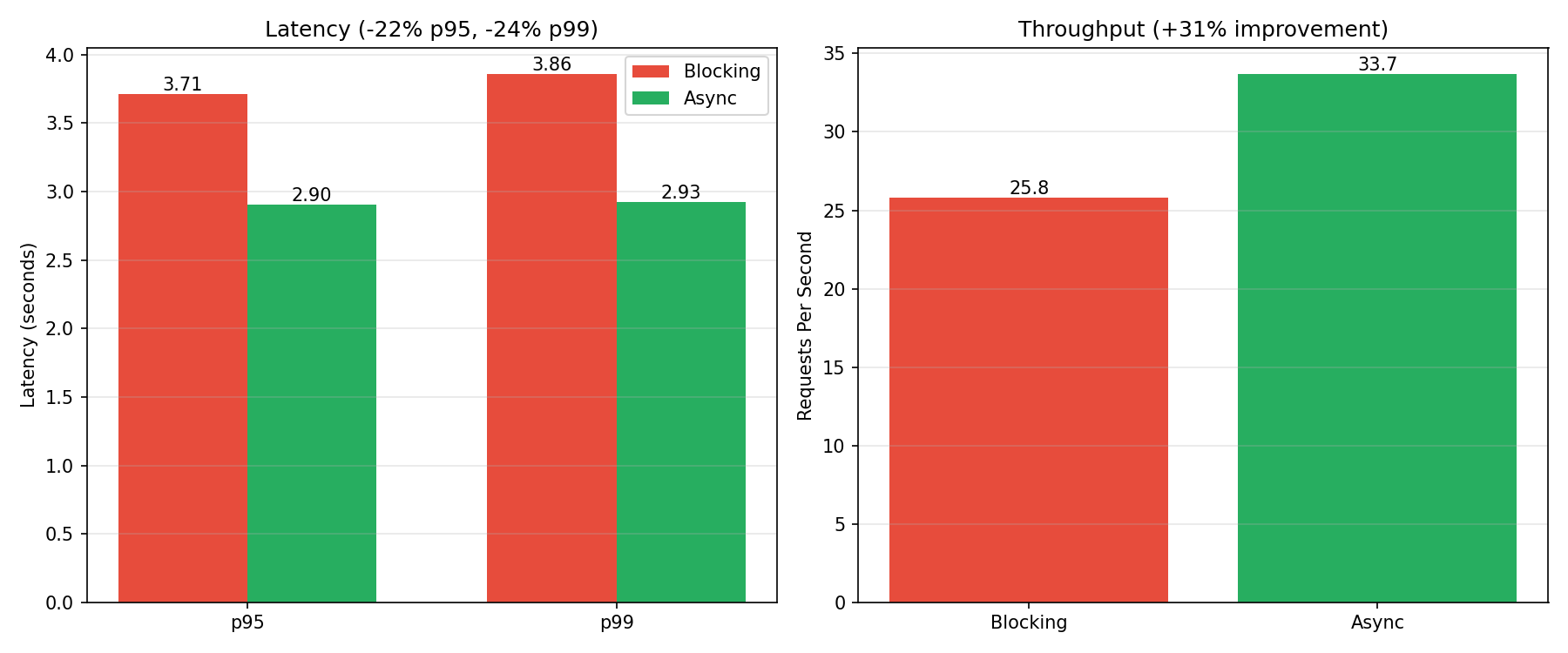
Blocking:  p99: 3.86s  |  25.8 RPS
Async:     p99: 2.93s  |  33.7 RPS

Improvement: +31% throughput, -24% p99 latency
1000 concurrent requests:
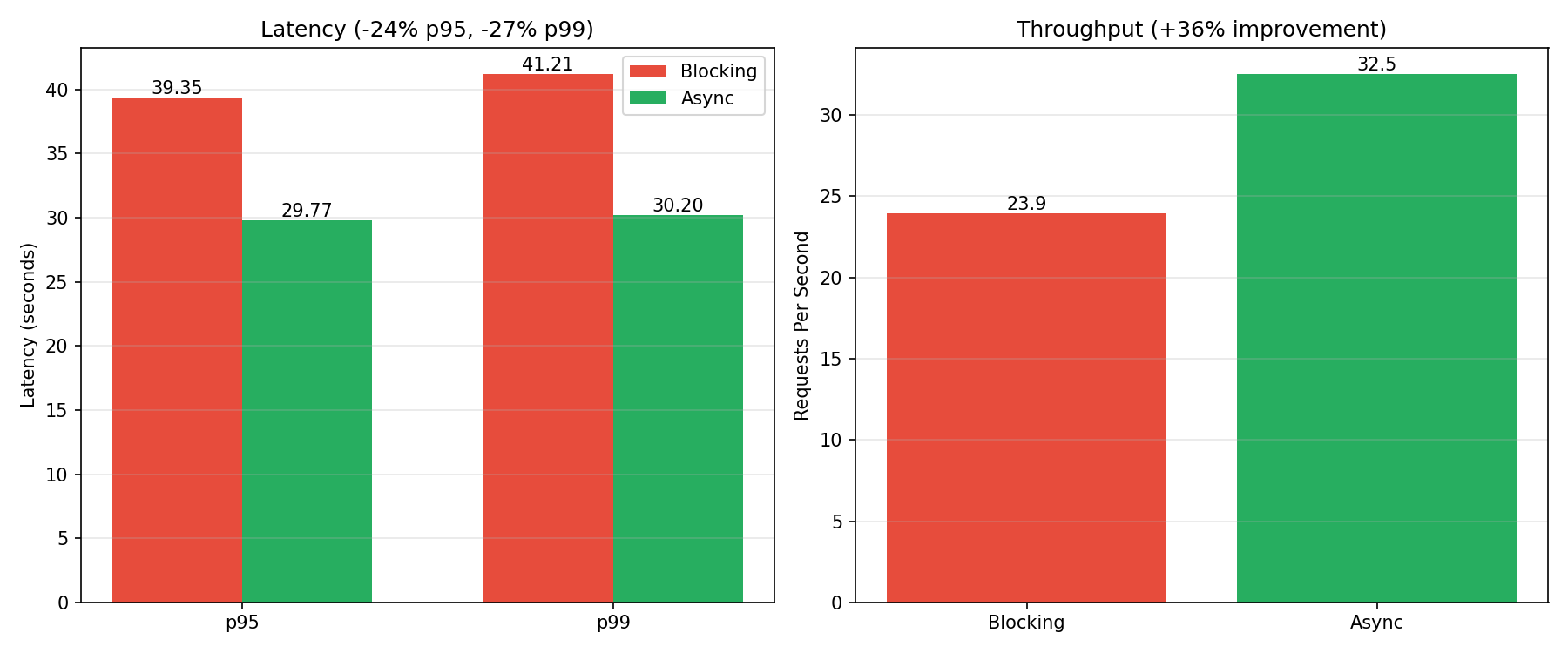
Blocking:  p99: 41.21s  |  23.9 RPS
Async:     p99: 30.20s  |  32.5 RPS

Improvement: +36% throughput, -27% p99 latency
Adding to Your Test Suite
pyleak includes a pytest plugin. Add the marker to detect blocking automatically:
@pytest.mark.no_leaks(blocking=True, blocking_threshold=0.1)
@pytest.mark.asyncio
async def test_no_blocking():
    await your_async_function()
Now any blocking over your threshold fails the test with a stack trace.
TL;DR
- Sync code inside
async defblocks the entire event loop - Linters don’t catch it, tests pass, production breaks
- Common culprits:
boto3,requests, file I/O, ORMs, PDF libraries - pyleak detects blocking and shows you exactly where
pip install pyleak